Shopify
Unwrap integrates with Shopify to pull in customer, order, and product data from your store. This integration requires creating a custom app in your Shopify Admin to generate API credentials then sharing these credentials with Unwrap.
Prerequisites
- You must be the store owner or have a staff/collaborator account with the Develop apps permission
- Admin access to enable custom app development in your Shopify store
Step 1: Enable Custom App Development
Before you can create a custom app, you need to activate custom app development in your Shopify store.
- From your Shopify admin, go to Settings > Apps and sales channels
- Click Develop apps
- Click Allow custom app development
- Read the warning and information provided, then click Allow custom app development to confirm
Step 2: Create a Custom App
- From the Develop apps page, click Create an app
- Enter an App name (e.g., "Unwrap Integration")
- Select an App developer (this can be the store owner or any staff/collaborator with the Develop apps permission)
- Click Create app
Step 3: Configure API Scopes
After creating the app, you need to assign the required API scopes.
- Click Configure Admin API scopes
- In the Admin API access scopes section, search for and select the following scopes:
read_customersread_ordersread_product_feedsread_product_listingsread_products
- Click Save
Step 4: Install the App and Get Your Admin API Access Token
- Click Install app
- In the confirmation dialog, click Install
- In the Admin API access token section, click Reveal token once
The Admin API access token is only displayed once. Make sure to copy it immediately and store it securely before navigating away from this page. If you lose the token, you'll need to uninstall and reinstall the app to generate a new one.
Step 5: Submit Your Access Token to Unwrap
- Navigate to app.unwrap.ai/secrets
- Enter a Secret Name to identify this integration (e.g.,
your_company_name_shopify) - In the Secret Value field, paste in the Admin Auth Token:
*********13123
- Click Save
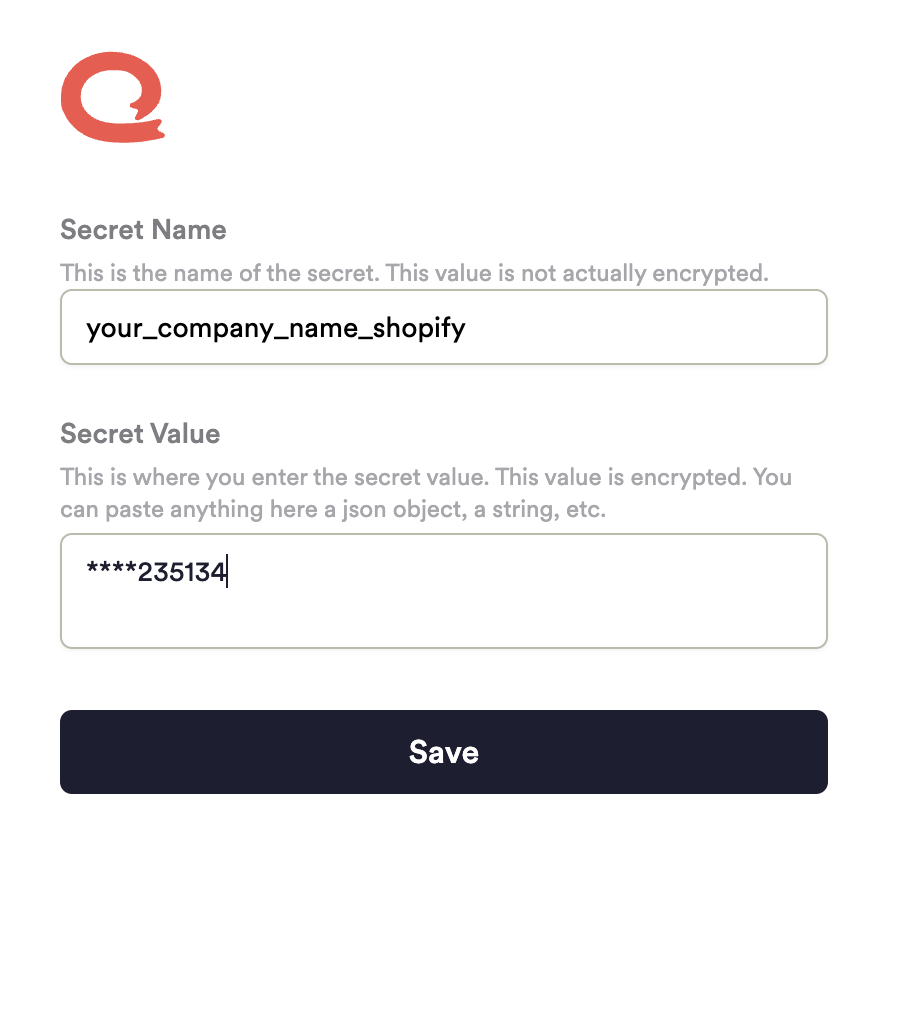
Your credentials are encrypted and written directly to AWS Secrets Manager. Unwrap never stores your API tokens in plain text.
Once you've submitted your credentials, contact your Unwrap representative or email contact@unwrap.ai to complete the integration setup. Data ingestion and analysis will begin shortly after configuration is complete.