June 2026
Last updated: July 8, 2026
Usage Reporting Dashboard
See how your organization is actually using Unwrap. The new Reporting dashboard gives Admins a single view of active users, Assistant adoption, and Group engagement across every surface — web, API, MCP, and Slack.
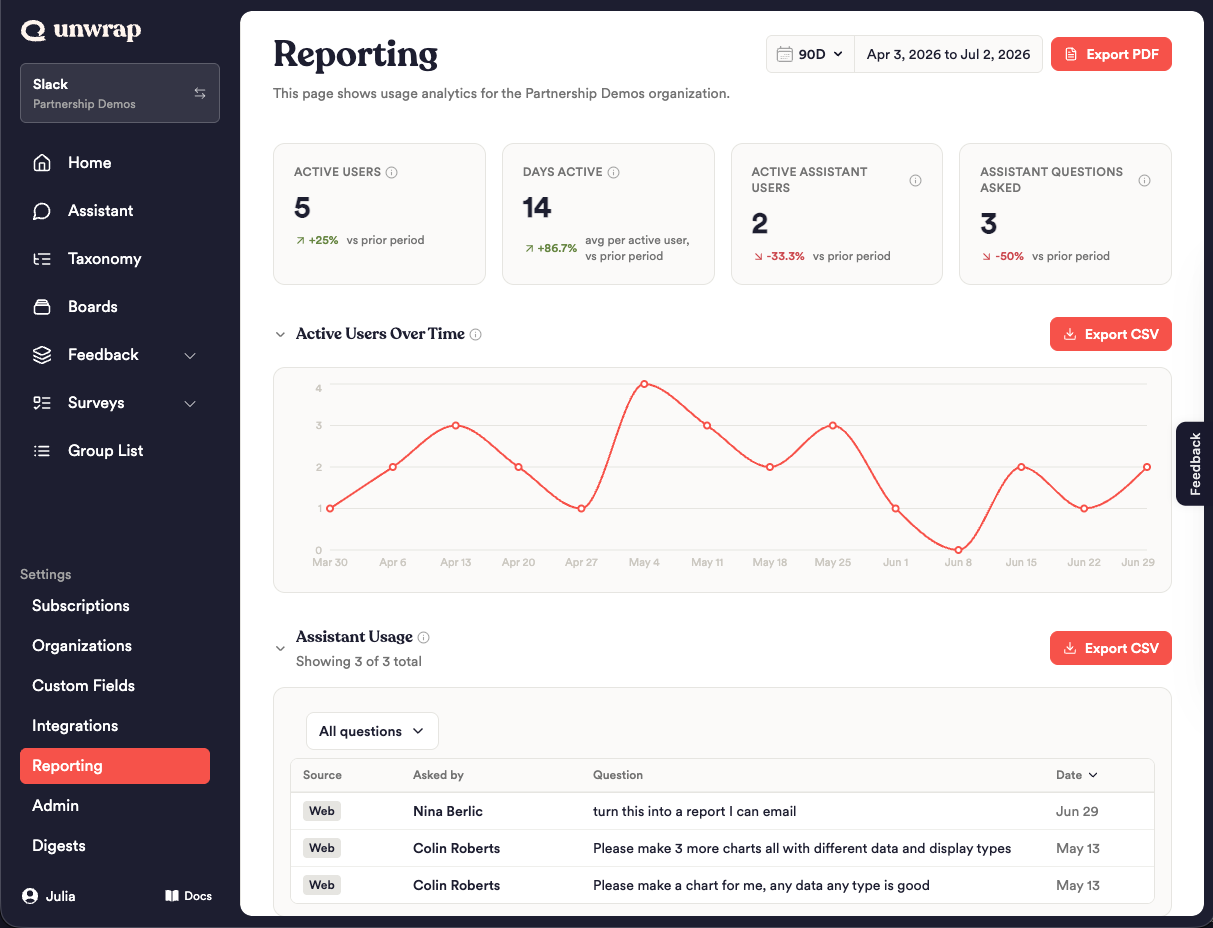
What admins can do:
Track usage of Unwrap at a glance and over time
Identify the most active users within your organization
Export usage data
Merging and Deleting Custom Fields
Organize and clean up your custom fields. You can now merge two fields into one to consolidate overlapping metadata, or delete fields you no longer need.
What you can do:
Merge two custom fields into a single field, combining their values and source mappings. This allows you to easily remediate duplicative fields representing the same concept.
Delete custom fields - permanently delete a custom field that was added erroneously or is no longer needed.
Survey Question Branching
For any survey question, you can now customize what happens next — routing follow-ups based on how someone responds, so every respondent only sees the questions that apply to them.
What you can do:
Branch on quantitative questions by selected options (e.g., number of stars, Y/N selections)
For every question, choose a fallback path: continue to the next question, jump to a specific one, or end the survey
New Integrations
Slack
Pull messages from Slack channels directly into Unwrap as feedback. This replaces our previous Zapier-based Slack integration
Sprout Social
Import social listening data from Sprout Social